Flip through the racks
- Flip through racks of records just like you did in your favorite music store.
- No annoying recommendations – just hours of raw flipping through a gigantic music collection.

Miss flipping through physical records in your favorite store? Say no more!
Digital Disc is like your favorite music store, but as an app integrated with Apple Music. Rediscover the magic of long-forgotten CDs, vinyls and cassettes – flip through them like it's 1995 and import them as perfectly ordered Apple Music playlists.
Paid app on the App Store. Creating playlists requires an active Apple Music subscription.
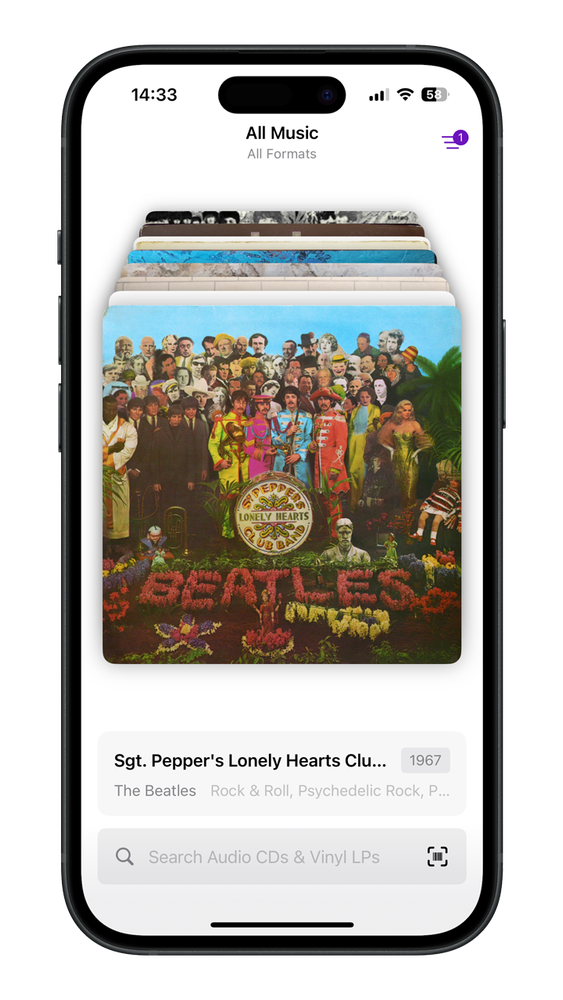
Just like a real music store from the 70s, 80s and 90s – almost everything that was ever published, including the cover art.
While Apple Music has many individual albums and tracks, it does not have all the CD, vinyl and cassette releases ever made. That CD collection you saw on TV and wanted as a kid? Yup, that's here.
Lost some of your favorite records? No problem – they're still here. Digital Disc is the fastest and easiest way to convert these gems into perfectly ordered Apple Music playlists.
Browse, filter and explore over 18 million releases to find virtually any record ever made.
The high-speed barcode scanner recognizes millions of CDs, vinyls and cassettes instantly and on the go.
Uses Apple's built-in Music app integration automatically. Say goodbye to manual playlist creation.
Keep the tangible art of a physical collection while enjoying the convenience of streaming anywhere, anytime.
Bring back the good vibes of the times when music was a real physical thing.
Flip through the racks, filter by era, genre, format or country – or scan the barcode of a CD, vinyl or cassette you own.
Look at the front and back covers, inlays and track list, and preview the music – even without an Apple Music subscription.
Digital Disc matches every track in the Apple Music catalog and creates a playlist in the exact order of the original release.
Digital Disc does not collect any of your personal data or any usage data. It only asks for three permissions:
Connects to the Internet to search music databases.
Searches and matches Apple Music tracks for your album or compilation and creates a playlist when you request it. No data from your Music account is read.
Write-only access to store album art like covers in your Photos app. No data from your Photos app is read.
The permissions are solely used for write-only access. Read the full privacy policy.
Please note these details before you start flipping.
An active Apple Music subscription is required to create playlists. Previewing music is confirmed to work without an Apple Music subscription, so you can browse and listen in before you subscribe.
No. Digital Disc does not play or rip audio directly. It uses the Discogs database to identify, browse and filter physical media, and creates corresponding playlists using the Apple Music catalog.
Yes – that's the point. Compilations, regional pressings and TV-advertised CD collections often don't exist as albums on Apple Music. Digital Disc knows the original track list and rebuilds it as a playlist from the tracks available in the Apple Music catalog.
The scanner recognizes millions of CDs, vinyls and cassettes – just point your iPhone camera at the barcode on the back of the sleeve or case.
Download Digital Disc today and rediscover the records you grew up with. Know a friend who still misses the record store? Send them the app.
Questions or feedback? Email hello@kammerath.com.